Footmouse
A footmouse (or foot mouse[1]) is a type of computer mouse that gives the users the ability to move the cursor and click the mouse buttons with their feet.
It is primarily used by users with disabilities or with high-back or neck problems.[1] It is also promoted as a way to prevent such problems in the future and as a means to increase productivity by not having to move one's hand between the keyboard and mouse.[2]
Types
There are about ten types of footmouse. Not all of them are commercially available. Some specialized companies design their own foot controlled mouse for disabled people.
The main difference between the different types of footmouse is a flat pedal which slides or a pedal which tilts. There also exists a mouse adapter which converts a conventional mouse to a footmouse that slides and horizontally tilts to one side. A footmouse that uses sliding can be a slipper with a mouse connected to it, or a special frame in which a pedal can move around. Also a tiny magnet or other location device can be used on a tablet. A footmouse that uses a tilting pedal has one or two pedals which are able to tilt and turn in one or more directions. Buttons that are pushed by the feet are not considered footmice.
-
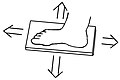 Footmouse that slides in four directions.
 -
 Footmouse that tilts and rotates.


Use
Using a footmouse is slower than a regular mouse (a handmouse), since most people have less control over precise movements with their feet and legs than with their hands. (Human-computer interaction researchers note even though people commonly use foot pedals to control cars, sewing machines, or speech transcription equipment, foot-operated controls are used in these applications for starting and stopping, rather than navigating.[3])
If the footmouse is used together with a keyboard, the cursor can be moved around while typing, so there is no time wasted for moving the hand between the keyboard and the mouse. If a person cannot use a keyboard, a virtual keyboard on the screen can be used to type text by clicking each character on the virtual keyboard. People who also have less control over their foot and leg movement and are unable to operate a footmouse can sometimes use a few switches for setting the cursor in a certain direction.
If a footmouse is used incorrectly for a long time, it can cause muscle cramp in the legs, and can have a negative influence on lower back problems.[why?]
History
Footmice were available in the US market as early as 1985. The manufacturer that promoted them at the time was called Versatron.[2]
See also
- Dance pad, a foot control device used in some computer games
External links
- Demonstration of a home-made Footmouse on youtube
- Instructions how to build inexpensive Footmouse
- Hand-to-Foot Mouse Adapter on YouTube
- Mouse Sensitivity Converter
Notes
- ^ a b Simpson, Richard C. (2013), Computer Access for People With Disabilities: A Human Factors Approach, Rehabilitation Science in Practice, CRC Press, pp. 58–59, ISBN 1466553715
- ^ a b Harriman, Cynthia W. (1985-09-23), "Alternatives for cursor control: footmouse, pad, or view system", InfoWorld, 7 (38): 48–49
- ^ Fassbender, Eric; Richards, Debbie (2008), "Using a dance pad to navigate through a virtual heritage environment of Macquarie Lighthouse, Sydney]", in Kenderdine; Docherty, Michael (eds.), VSMM 2007, Volume 4820 of Lecture Notes in Computer Science / Information Systems and Applications, incl. Internet/Web, and HCI, Springer, p. 10, ISBN 3540785655
Content Disclaimer
Informasi ini disarikan dari Wikipedia dan disajikan kembali untuk tujuan edukasi. Konten tersedia di bawah lisensi CC BY-SA 3.0. Kami tidak bertanggung jawab atas ketidakakuratan data yang bersumber dari kontribusi publik tersebut.
- The information displayed on this website is sourced in part or in whole from Wikipedia and has been adapted for the purpose of restating it. We strive to provide accurate and relevant information, however:
- There is no guarantee of absolute accuracy. Wikipedia is an open, collaborative project that can be edited by anyone, so information is subject to change.
- It is not intended to constitute professional advice. The content displayed is for informational and educational purposes only. For important decisions (e.g., medical, legal, or financial), please consult a professional.
- Content copyright. Wikipedia is licensed under the Creative Commons Attribution-ShareAlike License (CC BY-SA). This means that content may be reused with appropriate attribution and shared under a similar license.
- Responsible use. Any risk arising from the use of information from this website is entirely the responsibility of the user.