LCD Smartie
 | The topic of this article may not meet Wikipedia's notability guidelines for products and services. (April 2017) |
| LCD Smartie | |
|---|---|
 | |
 LCD Smartie 5.4 | |
| Original authors | BasieP, Chris Lansley |
| Initial release | 24 August 2001 |
| Stable release | 5.6
/ 19 October 2023 |
| Written in | Delphi |
| Operating system | Microsoft Windows |
| License | GPL or LGPL |
| Website | lcdsmartie |
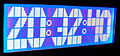
LCD Smartie is open-source software for Microsoft Windows which allows a character LCD to be used as an auxiliary display device for a PC. Supported devices include displays based on the Hitachi HD44780 LCD controller, the Matrix Orbital Serial/USB LCD, and Palm OS devices (when used in conjunction with PalmOrb). The program has built in support for many systems statistics (i.e. CPU load, network utilization, free disk space...), downloading RSS feeds, Winamp integration and support for several other popular applications. To support less common applications LCD Smartie uses a powerful plugin system.
The project was started as freeware by BasieP who wrote it in Delphi. After running the software as freeware from 2001 to late 2004, BasieP passed the project on to Chris Lansley as an Open Source project hosted on the SourceForge servers. Chris Lansley maintained the project for few years, and now the whole project remains alive thanks to the program community. LCD Smartie is a relatively mature software and development of the main executable has slowed considerably, most of the new features are introduced by new plugins which are released by both the core team and by the community. The LCD Smartie forums are the primary source for support and developer discussion.
To facilitate the use of LCD Smartie on modern PCs running version of Windows 7 and 8 the team has started working on a USB interface to connect LCDs to a PC that does not require any additional kernel driver and provides a complete plug-and-play experience.
As of end 2023, the main program development has moved to GitHub. A new version (v5.6) has been released with significant updates and improvements.
Additionally, a new Android app which acts as an LCD screen emulator is available on GitHub under: [1](https://github.com/eeyrw/LcdEmulator/releases).
A DIY project to drive LCD screens via WiFi is also available on GitHub at: [2](https://github.com/eeyrw/LcdTcp).
-
-
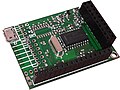 LCD Smartie official hardware PCB
 -
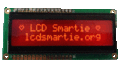 Orange LCD mounted on the LCD Smartie official hardware


External links
Content Disclaimer
Informasi ini disarikan dari Wikipedia dan disajikan kembali untuk tujuan edukasi. Konten tersedia di bawah lisensi CC BY-SA 3.0. Kami tidak bertanggung jawab atas ketidakakuratan data yang bersumber dari kontribusi publik tersebut.
- The information displayed on this website is sourced in part or in whole from Wikipedia and has been adapted for the purpose of restating it. We strive to provide accurate and relevant information, however:
- There is no guarantee of absolute accuracy. Wikipedia is an open, collaborative project that can be edited by anyone, so information is subject to change.
- It is not intended to constitute professional advice. The content displayed is for informational and educational purposes only. For important decisions (e.g., medical, legal, or financial), please consult a professional.
- Content copyright. Wikipedia is licensed under the Creative Commons Attribution-ShareAlike License (CC BY-SA). This means that content may be reused with appropriate attribution and shared under a similar license.
- Responsible use. Any risk arising from the use of information from this website is entirely the responsibility of the user.